Latest firmware versions
List of the current firmware versions for the VitalControl device.
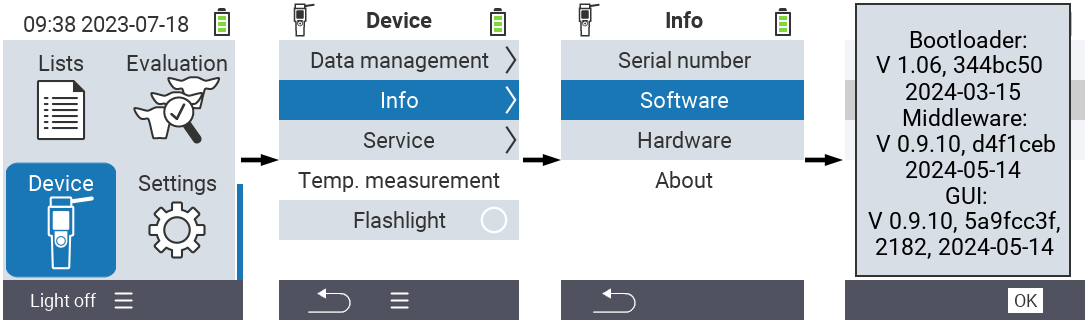
Determine firmware versions installed on your device
Open the menu item

Devicein the main screen of your VitalControl device.Invoke the submenu
Info, select the menu itemSoftwareand confirm withOK. A pop-up window opens which lists the software versions currently installed on your device:
Latest firmware versions:
The following table lists the current firmware versions:
| GUI-Firmware | Middleware | Bootloader | |
|---|---|---|---|
| Version | 1.1.1 | 1.1.1 | 1.0.6 |
| Date | 2026-07-03 | 2026-07-03 | 2024-03-15 |
| Commit Hash | cd6e3521 | 173d185 | 344bc50 |
| Commit № | 2233 | n/a | n/a |
Tip
If you miss newer features on your device or face stability problems, you are encouraged to update the firmware on your device to latest released version.